Showing posts with label artists. Show all posts

Monday, September 20, 2010

What If Selling Tees, Isn't For Me?


More and more, people are creating online stores filled with t-shirts displaying their artwork, as a way to earn (extra) income. This could be due to the fact that more people are becoming web savvy or because people have found that online shopping is more convenient. Whatever the reason, money is being made online as displayed in this graph by comSource, Inc. found at Mashable.com . The graph below, clearly displays the growth of sales by comparing sales made during the Holiday seasons in 2008 and 2009.


Remember, the dollar signs and percentages shown in the above graph, are that of holidays only, which in total, crosses the $27 billion dollars threshold. It does not include other money made during the rest of the year, so to say the very least, money can be made by becoming an online store owner.

Some of you reading this may already be an online store owner, while others might be contemplating becoming one. The big question is... What if your interest isn't in T-shirts, but you want to display your talents and still want to take part in the money being made online?

5 places online where you can express your creativity and sell your work:
Besides the obvious Print On Demand shops like, Zazzle and Cafepress, where you have the choice of selling t shirts only, merchandise only, or both; There are many other places online where you can sell your artwork that you may not be aware of. Here is a list of 5 places you might find useful to display and/or sell your work: (This list was created in no particular order)


  • Lulu.com - Provides self-publishing services for writers, musicians, film makers, and photographers. At Lulu.com you are able to create hard and soft cover books, CD's, DVD's, etc. Lulu helps you to sell your work at places like Amazon.com and provides useful tools to help with promoting your creation(s) on social media sites.


  • CreateSpace.com - Provides services for film makers, writers, and musicians. Here, you can create print on demand books, CD's, and DVD's and because it is owned by Amazon.com, your work is automatically included in the Amazon Catalog.


  • TheGameCrafter.com - Make your creative game idea(s) a reality through this website. Upload your artwork and game rules, state if dice, etc. need to be included and your game is now ready for sale.


  • 4. Tastebook.com - Create recipe books that hold up to 100 recipes. Not only can you choose to use your very own recipe, but you also are able to use recipes from third party providers.


  • 5. Spoonflower.com - Use your artwork, designs, and graphics to create print on demand fabric on either quilting or upholstery weight cotton or organic cotton sateen, with prices ranging from $18 – $32 per yard.


*(Be sure to always read the terms and services before trying an online service)*

There are many places online that can provide an outlet to those who want to become a part of the online selling community which are not listed here. These are just a few websites to help those who may not want to sell t shirts online, but are wanting to express their creativity while making money.
This list may also be found useful to those who are already an online store owner, who IS selling t-shirts, for they too can be used as another way to display your creative artwork on other products or may be a way to showcase your other talents while earning some extra cash.


Written By: Amanda Ryan, Creature Creations, Personalized Photo Gifts

Tuesday, June 15, 2010

Photoshop VS Illustrator In The Tee Ring


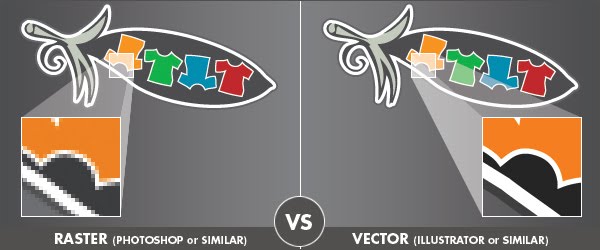
Raster images are composed of connected dots (pixels) and vectors are images composed of connected lines. Each pixel is a tiny square, whereas vector images are defined by math, not pixels. Vectors can be scaled up or down without any loss of quality.

Raster Art VS Vector Art - Graphic Diagram Illustrating the Differences

Photoshop (raster art) and Illustrator (vector art) are both used by designers when creating t-shirt designs. Each have their value in the design world and designers have various reasons for their use. I personally cringe anytime I hear a senior designer tell a junior that "this is the way you do it", which is often the way that certain designer has chosen to do it. Design, as per any form of creativity, can and should involve the individual's touch, and that means allowing a designer to develop their own methods for achieving the style they wish to express in any given concept.
 
That doesn't mean that there aren't very valid reasons for the use of each. By listening to the point of view of your peers, you can learn from their experiences and points of view which can inspire your own methodologies.
 
Namaste Tee Design by GritFX T-ShirtsFor me, when it comes to t-shirt design, the process currently entails the use of Illustrator and Photoshop hand in hand... if only I could find a way to apply that to my use of Twitter and Facebook! Artwork requirements for me at present do not require colour separations - direct-to-press is usually an output of a digital png file. However, should my path take a turn for independence (which is the ultimate agenda), then those files will need clear colour separations. Thinking ahead, I try to set up each file in anticipation for that day.
 
The majority of my initial design and typography is created in Illustrator. On the occasions that we (GritFX) decide a design is suited to some "grit" (aka: a GritFX worn texture look), my final layouts are saved out as layered Photoshop files where I can then apply my chosen scanned texture as Photoshop masks. One could convert these into vector also, however I like to keep the natural gradients - the subtleties that the scan picks up - converting to vector would remove this. I consider Illustrator the superior program when creating effects with typography along with achieving geometry with greater ease.
 
I have all layouts backed up as vector artwork which gives me the flexibility to scale up a design for a larger t-shirt screen. When the day comes for us to go to the screen printers, the work involved is minimal - I may need to re-apply textures, but I'm not going to have to go back to the drawing board. If I decided no scaling is required, then my finished Photoshop files with final textures are set-up with layers, and colours can be separated from that file.
 
With my overview now out of the way, let's hear from some of our peers. The following were selected as I evaluated each as being strong representations of the use of each program, and how both have assets. Each designer was kind enough to chat with me and contribute to this post with their thoughts on why they work with what they do.


In the Photoshop corner...
(raster art examples)


1. Olga Shvartsur - Olechka Art + Design

Olga Shvartsur - Olechka Art + Design
"I sketch the drawing on smooth bristol paper, usually 11x14 inches, using graphite pencils, ranging from HB to 9B. Then I scan the drawing and open the file in photoshop CS 3 (I am on a Mac). After cleaning up smudges (using the dodge tool) and adjusting levels/contrast, I use a photoshop action which converts my black/white drawing into a transparrent image. Then, I use photoshop brushes to add color and effects (such as splatters, watercolors, etc) to my graphite drawing. Using multiple layers helps me achieve the desired effects.

I love photoshop because it makes my traditional drawings very versatile where I can add various effects and experiment with different techniques (and I LOVE the "un-do" option, which you don't always have in traditional drawing)."


Follow Olechka Art on Twitter * Join Olechka Art on Facebook

*****

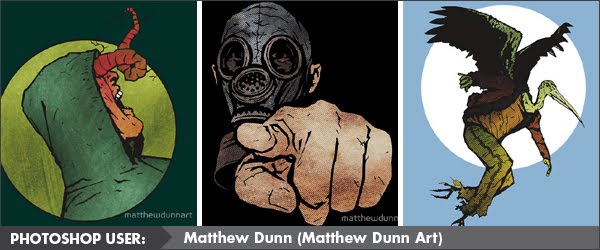
2. Matthew Dunn - Matthew Dunn Art

Matthew Dunn Art - Comic creator/Illustrator
"I mostly use Photoshop as it's the program I've worked with the most/longest so have a much stronger understanding of it (I'm still getting to know Illustrator and currently don't find it as flexible as PS). I do all my illustrations freehand then scan them in and build onto it in Photoshop, often adding different layers that I've also painted and scanned. The only filters I use in PS are the Halftones (I can't get enough of the old/rough comic book feel they provide, plus it's getting harder and harder to find sheets of halftone paper to manually stick down onto original art)."

Follow Matthew Dunn Art on Twitter * Join Matthew Dunn Art on Facebook
 
**********
 

In the Illustrator corner...
(vector art examples)


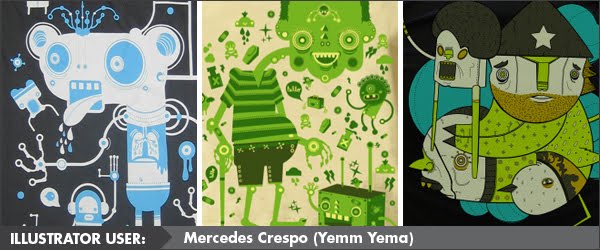
1. Mercedes Crespo - Yema Yema

Yema Yema
"I am a sucker for vectors! Love the sharpness and cleanliness. Also color feels brighter and fresh! Vectors are like fresh candy! I really just sketch and draw from my sketch, hardly never scan. Start by playing with circles and squares to create a nice composition. I have been told by friends, that I don't use the program to the fullest, what I tell them is that I use the program to to fit me and my art. If I ever need to learn a new technique, I just jump to a tutorial. But bottom line it's really not about what program is better, but what works best for the artist, and for me illustrator is my canvas."

Follow Yema Yema on Twitter * Visit the Yema Yema Emptees profile

*****

2. Peachanan Rojwongsuriya - The Peach Apparel

The Peach Apparel
"Basically I sketch on paper and scan. Then trace the image purely in illustrator. Vector is actually the reason why I use it. My artwork can be scaled up or down every time I want. Also, the file size is lesser compared to Photoshop. The result also looks cleaner as well."

Follow Peachanan on Twitter * Join Peachanan on Facebook

*****

Over to you the reader... what methods do you adopt when creating artwork for your t-shirts? Leave a comment with a link!


>>> LISTEN TO US DISCUSS THIS POST IN: Podcast 10: A Good Year to Succeed!


Created By: Amanda Vare "Manz", GritFX - Movies, TV, and Pop Culture T-Shirts

Tuesday, June 8, 2010

"The Waiting Game" Success!


Josh Charles is a singer, songwriter, and pianist, who is working diligently on promoting his album, "Love, Work, & Money," which was released in February of this year. Most of you, have more than likely heard the name, Josh Charles, long before Tees In A Pod featured his song, "The Waiting Game" in Podcast 8.
Josh's music was first recognized by his charity efforts for the song, "Healing Time." In 2009, Josh Charles moved to New Orleans, four days before Hurricane Katrina hit. From his experience, and for the love of New Orleans and it's people, he dedicated the song, "Healing Time" to help rebuild New Orleans. All of it's proceeds goes to the "Preservation Resource Center Of New Orleans" and is still available for download at Amazon.com.

Today, Josh Charles was a spotlight speaker and musician for the Mashable Media Summit, presented by CNN. In his speech, Josh highlighted the importance of how he uses Music and Social Media, by sharing how he first started out using MySpace in 2004, and since then, incorporating other various social media sites to connect with his fans. Josh begins his speech with the fact that there once was a time, where fans could only read about their favorite musicians in magazines, but now, with the help of social media, fans can connect "almost instantly" with musicians.

Josh states, "When asked if I was on Twitter... I had no idea what they were talking about..." but in 2008, Josh joined Twitter. He began tweeting about songs and other various topics relating to what he was working on at the time. During his speech, Josh mentions one follower in particular, who began sharing his tweets with fans of the "Dave Matthews Band" on Twitter. As a result, Josh began connecting with followers who liked his music as well. He stated, "I was thrilled to be able to connect with people and start making friends..."
He also expressed that when he was on the Rebuild Tour "it was very easy to tweet..." He found blogging took time he didn't have while touring, but still "being able to connect with people and make that connection was very, very special..."
Josh also shared what he has learned using Music and Social Media, "it is definitely about the engagement with people, it's social. It's not about the self promotion..." Being able to share what he is doing at any given time regarding his music, Josh finds, Twitter and other Social Media sites to be the"Most Powerful tool..."

As you all know, Tees In A Pod are advocates in using Social Media as part of any business. It is always great to hear those who are successful at what they do, share how they use Social Media and in how helpful it has been with their career. Tees In A Pod wishes to extend a congratulations for being a spotlight speaker and musician during the Mashable Media Summit today and a job well done for the two songs preformed, "The Waiting Game" and "Healing Time."

Social Media can make a difference and Josh Charles is proof of this. Begin connecting with those "waiting" to connect with you and success is sure to follow.

Spotlight on Music and Social Media with Josh Charles at the Mashable Media Summit 2010

Watch live streaming video from mashable at livestream.com


Written By: Amanda Ryan, Creature Creations, Personalized Photo Gifts

Saturday, June 5, 2010

Show Me The Music!


FREE EXPOSURE FOR MUSICIANS/BANDS... Want some FREE Exposure!? Get it in our podcast...

FREE EXPOSURE FOR MUSICIANS/BANDS... Want some FREE Exposure? Get it in our podcast...
We'll tweet about it; talk about it on our Facebook Fan Page; blog about it; and we'll let all our listeners know where to find you!

Are you in a band? Solo artist and/or musician? We want to hear from YOU! Tees In A Pod loves featuring new artists during our music segment in each podcast we put out to the world every Monday! Let us know if you would like to take part! Email us at teesinapod@gmail.com with your name (name of band if needed) and an MP3 of your song you wish for us to play. Also feel free to connect with us on the Tees In A Pod MySpace page too! We will then let you know if you will be featured!

Please note: music with profanity will not be accepted. Those interested can contact us (by leaving a comment below) here OR express their interest on our Facebook Fan Page wall.

Thanks and we look forward to hearing from you!

- Tees In A Pod Team -